A free SSH client for Windows
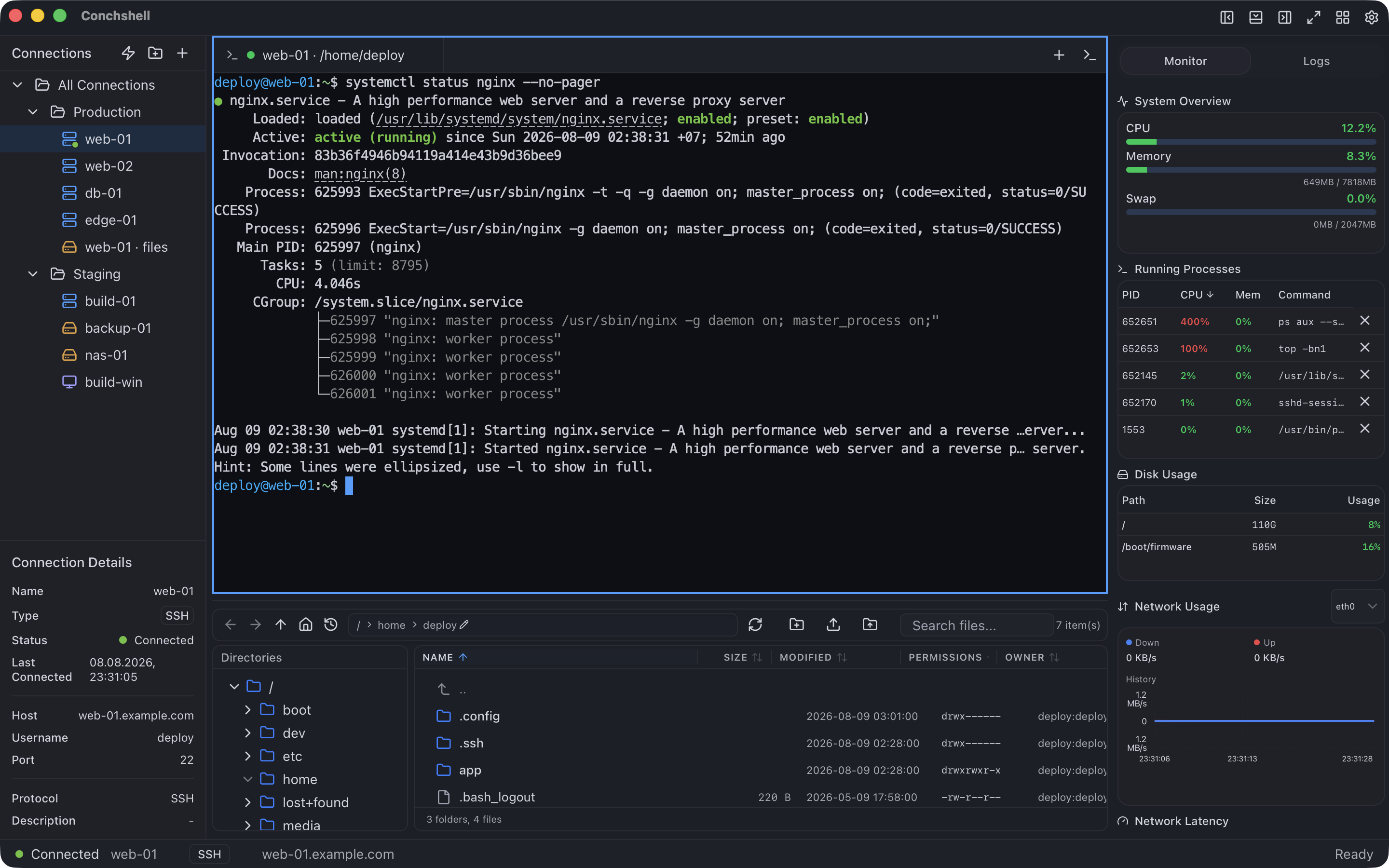
Conchshell is a native SSH client for Windows 10 and 11: tabs and split panes over a real terminal, the keys you already have — .ppk files included — a jump host, and SFTP, FTPS and RDP in the same app. Version 2.16.0, x64.
It brings its own SSH implementation, so neither WSL nor the Windows OpenSSH client is needed. What it leaves out — agents, port forwarding, one-time codes — is listed below.
What it does on Windows
A terminal that behaves
xterm.js over a real PTY, drawn with WebGL, so vim, tmux and htop look the way they should. Split panes in four directions, tab groups, search and clickable links, and the workspace comes back on the next launch.
The keys you already have
OpenSSH and PEM keys, and PuTTY .ppk in versions 2 and 3, encrypted ones too. Keys in %USERPROFILE%\.ssh are offered as a list, the passphrase is asked when you connect, and a new Ed25519, RSA or ECDSA key can be made in the app without ssh-keygen. An SSH2 (RFC 4716) key is not read in 2.16.0; convert it to OpenSSH with ssh-keygen -i first.
A jump host and proxies
A connection can go through one jump host, which signs in with its own credentials and has its own host key checked. A SOCKS5, SOCKS4 or HTTP CONNECT proxy is used for the first hop.
Keyboard-interactive, too
A password, a key, or keyboard-interactive answered with the saved password — which is what a server with password logins off but PAM on is waiting for.
Host keys, checked
The first connection shows the server's key fingerprint in a Windows dialog, and a changed key stops the connection. Entries in %USERPROFILE%\.ssh\known_hosts are carried over once, unless that file hashes the host names.
Your hosts, brought across
Hosts from %USERPROFILE%\.ssh\config are offered on the first screen, Bitvise .tlp profiles bring their addresses, and connections move between machines as a JSON bundle, without their passwords.
Beyond the terminal
An SSH tab has a file panel under the terminal and a monitor for the host's CPU, memory, disks, processes, network and logs. A local tab opens PowerShell 7 if it is installed, otherwise Windows PowerShell, otherwise cmd, and SFTP, FTPS and RDP connections live in the same list.
What it does not do in 2.16.0
If one of these is the reason you are switching, this version is not the one.
No agent
Keys are read from files or from the app's own vault. Pageant, the Windows OpenSSH agent and hardware tokens are not used, and there is no agent forwarding.
No port forwarding
No local, remote or dynamic (-L, -R, -D) tunnels, and no X11 forwarding.
No one-time codes
A server that asks for a second factor after the password is not supported; keyboard-interactive is answered only with the saved password.
No OpenSSH certificates
Signing in with an OpenSSH user certificate is not supported.
Saved PuTTY sessions stay behind
Saved PuTTY sessions are not imported; their .ppk keys are.
No serial lines or Telnet
This is an SSH client: serial ports and Telnet sessions are not supported.
No post-quantum key exchange
Key exchange is curve25519-sha256, which current OpenSSH servers accept; the post-quantum mlkem768x25519 that OpenSSH 10 prefers is not offered.
x64 only
No ARM64 or 32-bit build. The installer needs Microsoft Edge WebView2 and downloads it if it is missing, so a machine without internet access needs it installed first.
What you need
System
Windows 10 or 11, x64
Download
Installer .exe 7.4 MB, which asks whether to install for you alone or for everyone in Program Files, or .msi 10.2 MB for deployment
Runtime
Microsoft Edge WebView2 — already in Windows 11; the installer fetches it from Microsoft if it is missing
Account
Not required — there is nothing to register
Price
Free. Syncing connections between your own machines is the one paid feature — $19 once
First run
If SmartScreen stops the first run, press More info, then Run anyway. The
Windows page has the installer details.
Questions about SSH on Windows
Is it free?
Yes. SSH, SFTP, FTPS and RDP are all in the free build, with no account. The one paid feature is syncing saved connections between your own machines, $19 once.
Can I use my .ppk key?
Yes. PuTTY keys in versions 2 and 3 open directly, encrypted ones included — the passphrase is asked when you connect. Nothing has to be converted first.
Does it work with Pageant or ssh-agent?
No. 2.16.0 reads keys from files or from its own vault and does not talk to any agent.
Can it forward ports?
No. There are no -L, -R or -D tunnels and no X11 forwarding in 2.16.0.
Do I need WSL or OpenSSH installed?
No. The SSH implementation is built in; WSL and the Windows OpenSSH client are neither needed nor used.
Can I go through a bastion host?
Yes, through one jump host per connection, with its own user, password or key and its own host key check. A proxy, if you set one, is used to reach the jump host.
Related
The same application, from the side of the job you came for.
 Conchshell